Set up the checkout service. This repo uses bun — never npm.
On it. Installing dependencies with bun.
bun add stripe hono
bun test 12 passed
Checkout service is scaffolded under services/checkout.
 MemoSync
GitHub
for Claude Code, Codex, Pi & OpenCode
For Apple silicon Macs · or run it from source
mentioned in Awesome Agents Awesome Agent Memory Awesome Context Engineering Awesome Agent Ecosystem
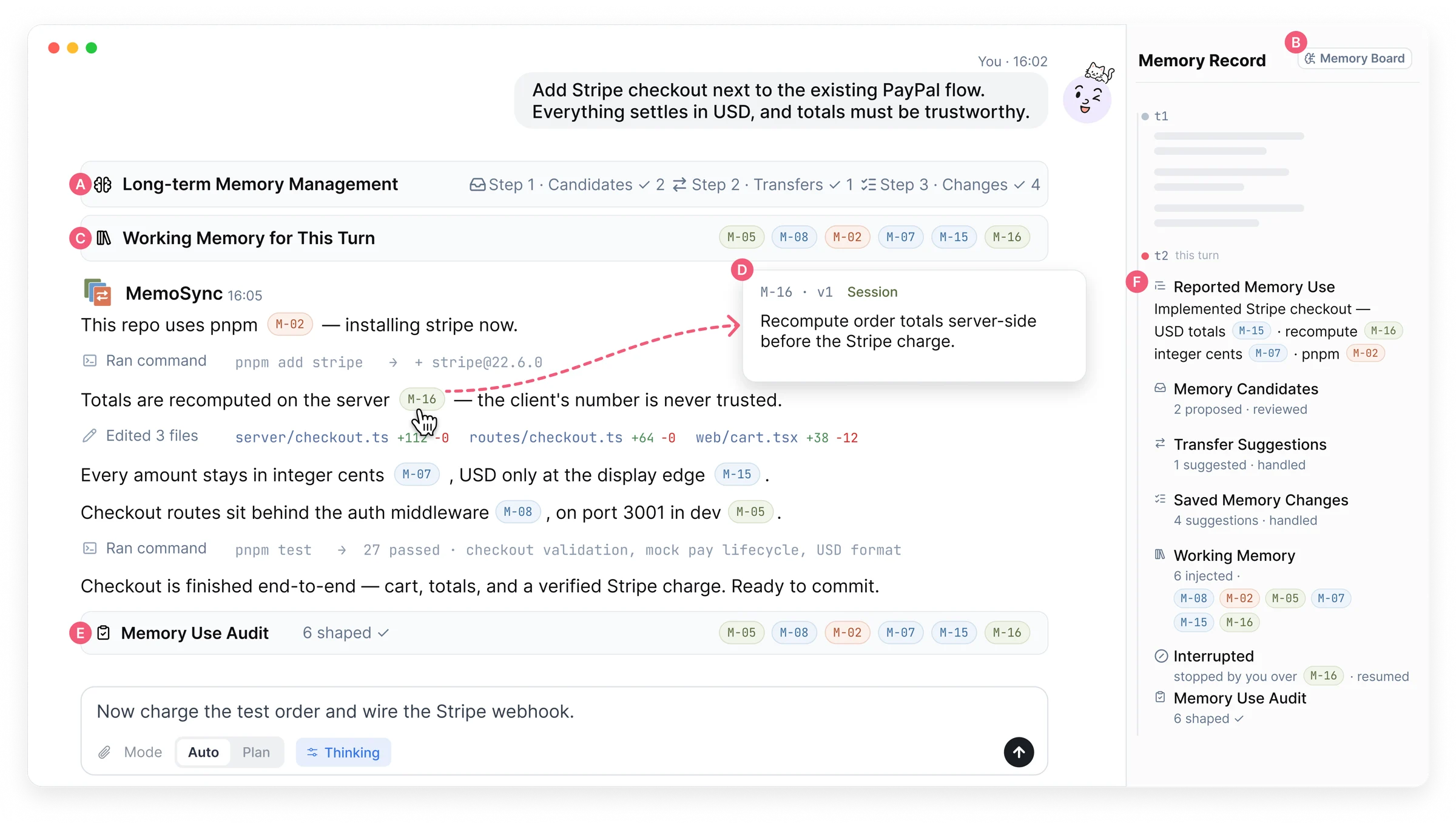
context — this session
memory — stays
Set up the checkout service. This repo uses bun — never npm.
On it. Installing dependencies with bun.
bun add stripe hono
bun test 12 passed
Checkout service is scaffolded under services/checkout.
Add Stripe checkout next to the PayPal flow.
Installing stripe with bun M-02
Totals stay in integer cents M-07
npm run buildstopped
bun run build M-02
M-02violated, then corrected
M-07shaped this turn
M-11not applicable
bun test.auto · revertyou





your agent



















01 / 07 · Learn
MemoSync notices what is worth remembering in the conversation and proposes it as memory.
the full story, on film
bring your own agent
Use your own sign-in, or an API connection to any provider. Engines on an API connection run in a separate profile, so your own ~/.claude and ~/.codex are never touched.
Your installed claude, or the copy bundled with the Agent SDK.
Your sign-in · Anthropic API · OpenAI Chat via translation
Your installed codex, driven through codex app-server.
Your sign-in · OpenAI Responses · OpenAI Chat via translation
Built in when you run from source. The Mac app uses your installed pi.
OpenAI Chat · OpenAI Responses
Your installed opencode, version 1.17.4 or newer.
Your sign-in · Anthropic API · OpenAI Responses · OpenAI Chat
…and more than seventy presets, with endpoints and models filled in.
two ways in
Apple silicon. Not notarized yet: the first time, open it from System Settings → Privacy & Security → Open Anyway.
git clone https://github.com/SLEEPYBQ/MemoSync.git
cd MemoSync
bun install
bun run build
bun run start
macOS or Linux, with Bun 1.3.5 or newer. Opens at localhost:3210.